While checking kit that is kept in a holder, you may find a different asset in its place, or nothing. Replace and Remove record what you found without leaving the check. Medic52 moves the assets for you and keeps a record.
Before you begin
- You need Assets permission at User level or higher.
- The asset must be recorded as kept in a holder. See How do I keep an asset inside another asset?.
When to use Replace and when to use Remove
- Replace when a different asset is there instead. Example: the list says AED 3 but you found AED 5.
- Remove when the item is not there and nothing has taken its place.
Where do I find Replace and Remove?
There are two places:
- On the kit's own check. A bar at the top says Kept in and the holder's name, then Not the one you found? with Replace and Remove.
- On the holder's check. Each item under Confirm these assets are present has Replace and Remove buttons beside Present.
How do I replace an asset?
- Click Replace. The dialog is titled Replace and the item's name.
- Under "Replace (item) in (holder) with…", search for the asset that is actually there. Assets of the Same type are listed first, then Other assets.
- If that asset is kept somewhere else, Medic52 shows Confirm you are moving this from (current holder) to (holder).
- Click Next.
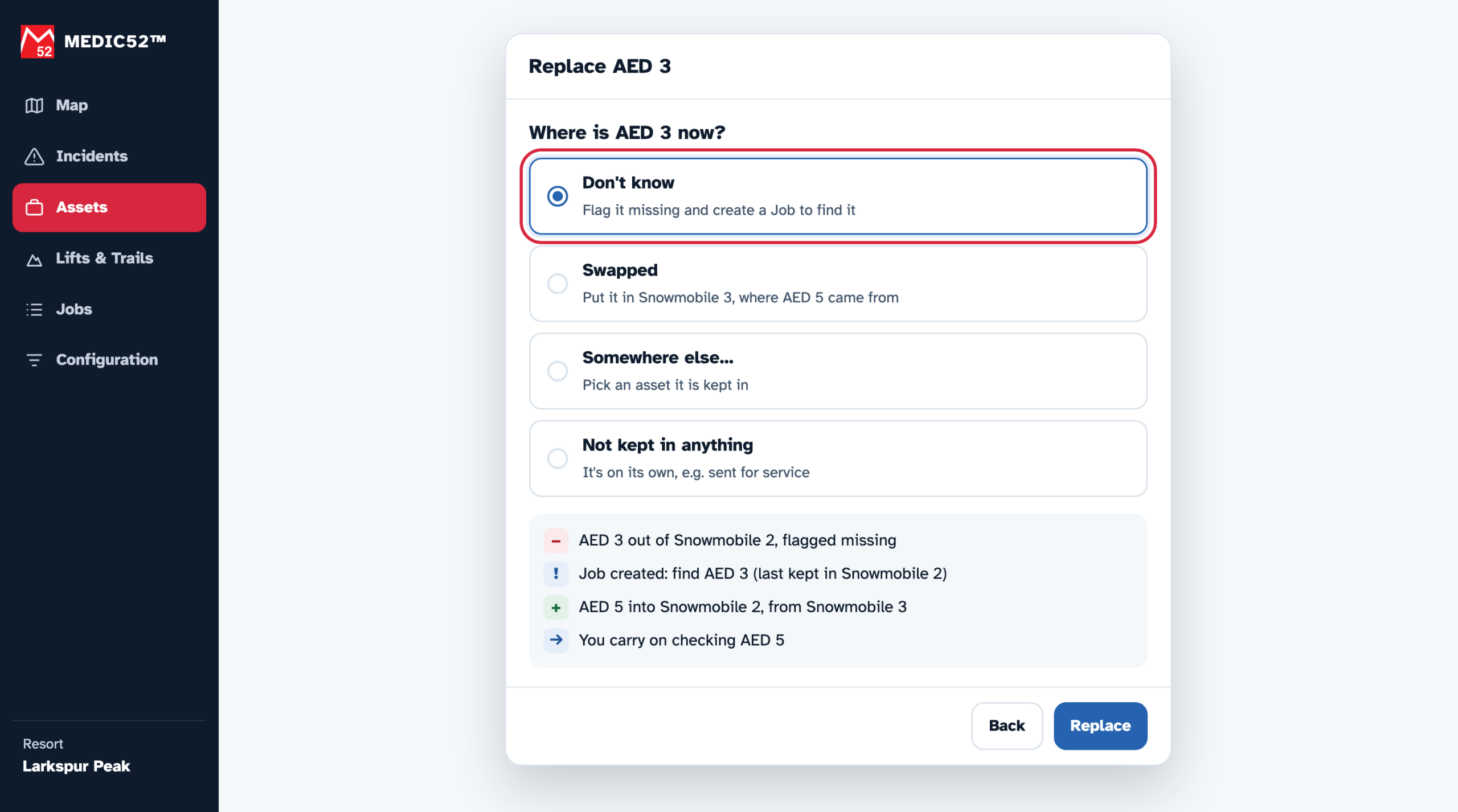
- Under Where is (item) now?, choose where the old item is. See the next section.
- Click Replace.
On the kit's own check, Medic52 then opens the check for the asset you found, with a message "(asset) is now kept in (holder)". On the holder's check you stay on the holder's check and the new asset counts as present.
How do I remove an asset?
- Click Remove. The dialog asks "Take (item) out of (holder)?" and says the holder will have nothing in its place until one is added.
- Choose where the item is now, as below.
- Click Remove. Medic52 returns you to the checks list and the item's check stays open.
Where is the old asset now?
Choose one of four answers. A summary under the choices lists exactly what Medic52 will do before you confirm.
| Choice | What it means | What Medic52 does |
|---|---|---|
| Don't know | You cannot say where it is. | Flags the item missing and creates a Job to find it. |
| Swapped | It went where the replacement came from. Only offered on Replace, when the replacement was kept in another holder. | Puts the old item in that holder. |
| Somewhere else… | You know which asset it is in. | You pick the holder under Put it in, and Medic52 moves it there. |
| Not kept in anything | It is on its own, for example sent for service. | Takes it out of the holder without putting it anywhere. |
What happens when kit is missing?
Choosing Don't know does three things:
- The item shows Missing (or "Missing, last kept in" and the holder's name) on the Assets and Checks lists.
- A Job is created in the Missing equipment category, due by the end of the day, with details like "Find AED 3 (last kept in Snowmobile 2). Found missing during a check by (your name)." It uses the item's department. If the item already has an open Job, Medic52 uses that one and does not create a second.
- The item's check stays open until someone finds it.
When someone puts the item into a holder again, by Kept in, Contents or Replace, it is no longer missing. See Jobs (Work Missions) overview.
Where are moves recorded?
Every move is recorded with who, when and the check it happened in. See Recent moves under Contents on the holder's page.
Frequently asked
Can I undo a Replace or Remove?
There is no undo button. Put the asset back by editing its Kept in field, or by using Add an item in the holder's Contents.
Why does the Replace button say it is moving an asset from somewhere else?
The asset you picked is currently kept in another holder. Replace moves it into this one. Confirm only if that is what you did.