When an asset has other assets kept in it (an AED in a snowmobile, say), Medic52 treats the check of the holder as a chance to confirm the kit is really there. This article is for patrollers and managers who complete checks. It explains how the Checks screen lists kit and how to complete a holder's check.
Before you begin
- The kit must be recorded as kept in the holder. See How do I keep an asset inside another asset?.
- You need Assets permission to see and complete checks. To use Replace and Remove you need User level or higher.
How does the Checks screen list kit?
On Assets > Checks, kit appears nested under its holder.
- A holder that is due shows an N inside due badge when some of its kit is also due, for example 2 inside due.
- A holder that is not due itself still appears as a heading row if any of its kit is due. The heading row says Not due itself today and has no button. This is so a due kit check never sits on its own where nobody looks for it.
- On the other tabs (Operational warning, Not operational, Operational), a holder row that only introduces its kit says Holds the items below.
- In the Location column, kit shows Kept in and the holder's name, or Missing if it was flagged missing.
How do I complete a holder's check?
Complete the check as normal, and confirm each item of kit on the way.
- In the left menu, go to Assets > Checks.
- Click Complete check on the holder's row.
- Work through the check steps. See How do I complete an Asset Check?.
- In Confirm these assets are present, look at each item of kit physically in the holder. For each one that is there, click Present.
- If an item is not the one you found, or is not there, click Replace or Remove on that item. See How do I replace or remove an asset during a check?.
- Click Complete check.
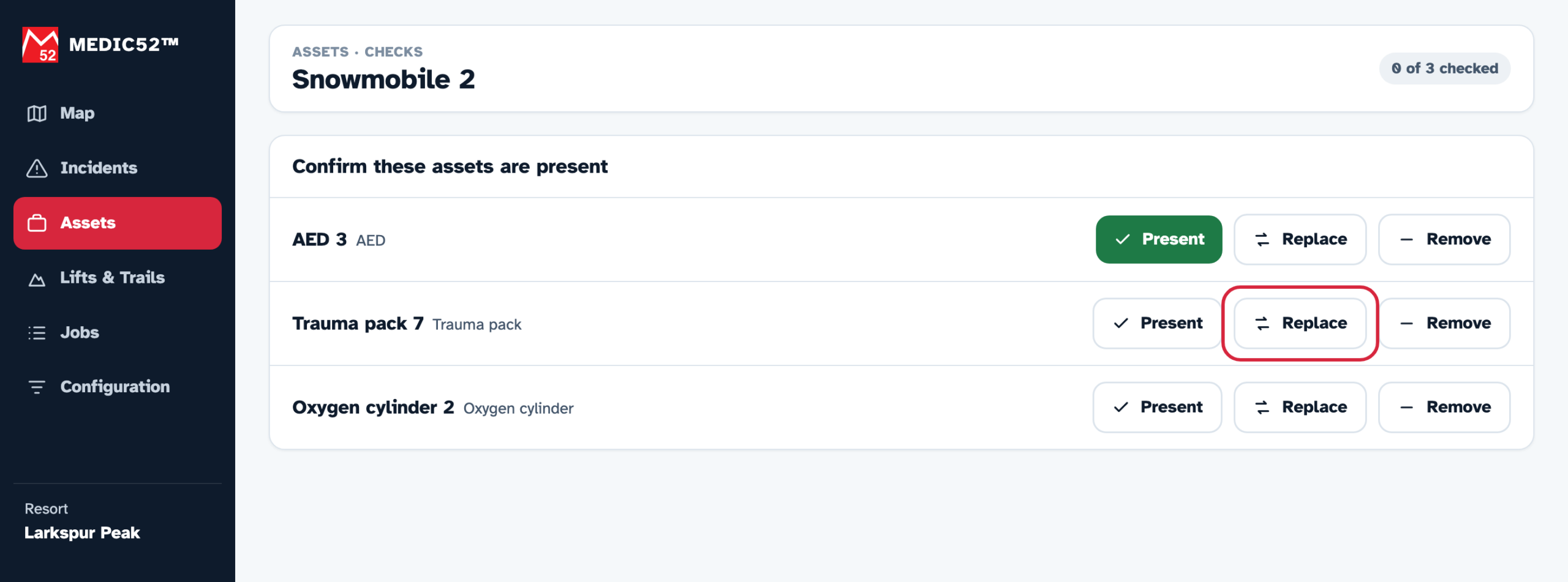
Important: You cannot complete the holder's check until every item is marked Present or has been replaced or removed. Medic52 shows "Mark each asset kept in it as present, or Replace / Remove it".
How do I check a single item of kit?
Open the kit's own check from Assets > Checks and complete it like any other check. At the top, a bar says Kept in and the holder's name, with Not the one you found? and the buttons Replace and Remove. Use them if the item in your hands is not the one listed.
Frequently asked
Why is a holder listed when it is not due?
Because some of its kit is due. The holder appears as a heading row so the kit checks are found with it. The row says Not due itself today.
Why can't I see Replace or Remove?
Your Assets permission is probably read-only. Ask a manager to raise it to User. The buttons also only show for an item that is kept in a holder.
Does Present change the item's own check?
No. Present only confirms the item is where it should be. The item still needs its own check when it is due.