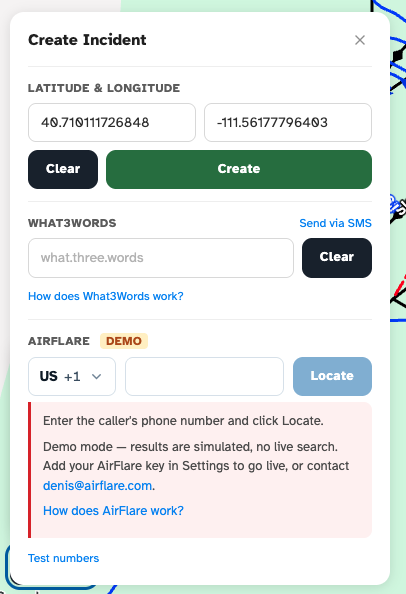
Every phone number field in the Medic52 web dashboard works the same way: a small country button (for example US +1) next to the number box. This article explains how to enter a number from any country, including a guest's or caller's phone number from overseas.
You'll find this phone field on:
- My Settings (your own phone number)
- Configuration › Users (adding or editing a team member)
- Incident forms (for example the injured person's Phone)
- The Create Incident card on the Dispatch map (AirFlare and What3Words Send via SMS)
How do I enter an overseas phone number?
You don't need to use the country list. Type the number with its international dialling code and Medic52 switches the country for you:
- Click into the phone number box.
- Type + followed by the country code and the number, for example
+61 412 345 678for an Australian mobile, or+44 7700 900123for a UK mobile.
As soon as the country code is recognised, the country button changes to match (for example from US +1 to AU +61). Typing 00 instead of + (for example 0061 412 345 678) works the same way.
When you leave the box, a complete number is tidied into that country's usual format.
How do I enter a local phone number?
When the number is from the country already shown on the country button, type it the way you'd normally dial it locally, for example (208) 555-0123 in the US or 0412 345 678 in Australia. You don't need to add the country code.
The country button starts on your resort's country (or, on your own settings, the country your browser is set to), so most local numbers need no extra steps.
How do I choose the country from the list?
If you prefer to pick the country first:
- Click the country button (for example US +1).
- Start typing a country name, its two-letter code (such as
AU) or its dialling code (such as61) to filter the list. - Click the country, or use the arrow keys and press Enter.
- Type the number in the number box.
Frequently asked
Why does a warning appear under the phone number?
The message "This doesn't look like a complete number for the selected country" appears when the number is too short or doesn't match the selected country. Check the country button and the digits. Medic52 still saves the number, so the warning never blocks you.
Can I press Enter instead of clicking Locate or Send?
Yes. In the AirFlare and What3Words Send via SMS sections of the Create Incident card, pressing Enter in the phone number box does the same as clicking Locate or Send.