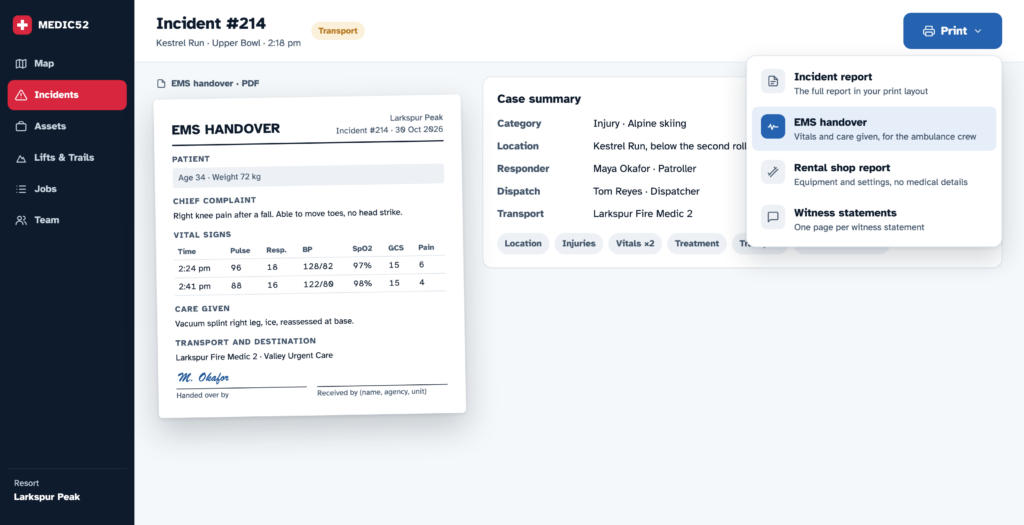
There’s a moment every patroller knows. The patient is packaged, the ambulance is at the base, and the medic taking over asks for “the paperwork”. What they want is a page they can read in thirty seconds: who, what happened, the vitals, what you gave and when. What they usually get is a printout of the full incident report, with the guest’s address, the pass number, the snow conditions and three pages they will never read.
Then the rental shop rings about the binding. They need the DIN settings and the ski number, not the patient’s medical history. And your risk manager wants the whole lot, signatures and all.
Same incident, three readers, three different needs. Until now Medic52 printed one report for all of them. As of release 6.6.0, it doesn’t have to.
Three reports from one incident
Managers can now offer extra print formats alongside the full incident report:
- EMS handover: the patient, the assessment, vital signs and the care given, laid out for the crew taking over care. Written to be read in a hurry, standing in a car park.
- Rental shop report: who, when and where, plus the equipment: activity, binding make and model, DIN settings, equipment numbers. No medical details beyond the area injured.
- Your full incident report: unchanged, in your own print layout.
On an incident, Print now shows a short menu of the reports you’re allowed to print. Pick one and you get a PDF on your resort’s paper size, A4 or US Letter, fitted to the page.
You decide who prints what
Paper is the leakiest part of any incident system. A printout gets left on a counter, handed over, photocopied. So each report has its own list of who may print it, set by role: Patroller, Dispatcher or Manager.
A common setup:
- Patrollers can print the EMS handover at the scene, because that’s where it’s needed.
- Only dispatchers and managers can print the full incident report.
- The rental shop report goes to whoever deals with the shop.
If someone’s role can’t print anything, they don’t see a Print button at all. And patient details (name, date of birth, address, phone) only ever print for people who are allowed to see them. Everyone else gets the report with a note that patient details are withheld.
Set it up in Configuration › Print formats. It takes about a minute.
Your paper form, your way
Many teams moved to Medic52 from a paper form their staff know by heart, and they want the printout to look the same. We still build those layouts for you, and now a layout can include more than the main report. One organisation this autumn has its main incident form, a separate witness statement page, and a 6 x 6 inch pocket field card, all printed from the same incident.
If your team carries a pocket card, fills in a separate witness sheet or hands over a particular form to your local EMS, send us a blank copy (never a completed one) and we’ll set it up.
Logos and signatures are back
While building this we found a fault from July: printouts had been leaving out the resort logo, signatures and photos. The incident data was never affected, and it’s fixed in 6.6.0. If you printed an incident since July and need a complete copy, print it again.
Get started
- Managers: open Configuration › Print formats and choose which reports your team can print. The full guide is in How do I choose which reports my team can print?
- Want your own layout or a pocket card? Contact support.
- Everything else in this release: Medic52 Web Release 6.6.0.
Thanks to the teams who asked for this. Most of what we build starts with a phone call from someone at the base saying “can it just do this?”
— Duncan
0 Comments
Leave A Comment