A Job that was raised by mistake, or is no longer needed, can be deleted. Medic52 asks for a reason and keeps the Job and its history for audit. Users with Admin Jobs permission can see deleted Jobs and restore them.
Before you begin
- To delete a Job you need the User or Admin Jobs permission.
- To see the Deleted tab and restore a Job you need the Admin Jobs permission.
How do I delete a Job?
- In the left menu, go to Jobs and click the Job card to open Edit job.
- Click Delete job in the bar at the top.
- In Delete this job?, enter a Reason. Medic52 says: "The job is removed from every list. It and its history are kept for audit. Say why it is being deleted."
- Click Delete job.
The reason is required, at least 3 characters. Without one Medic52 shows "Please give a reason for deleting this job." After you delete, you return to the Jobs screen and the Job is gone from To do, In progress and Done.
Note: Delete job only appears on a Job that already exists. A new Job you have not saved has no delete button.
Who can see a deleted Job?
Only users with Admin Jobs permission. Everyone else no longer sees it in any list, and a link to it does not open.
How do I see deleted Jobs?
- In the left menu, go to Jobs.
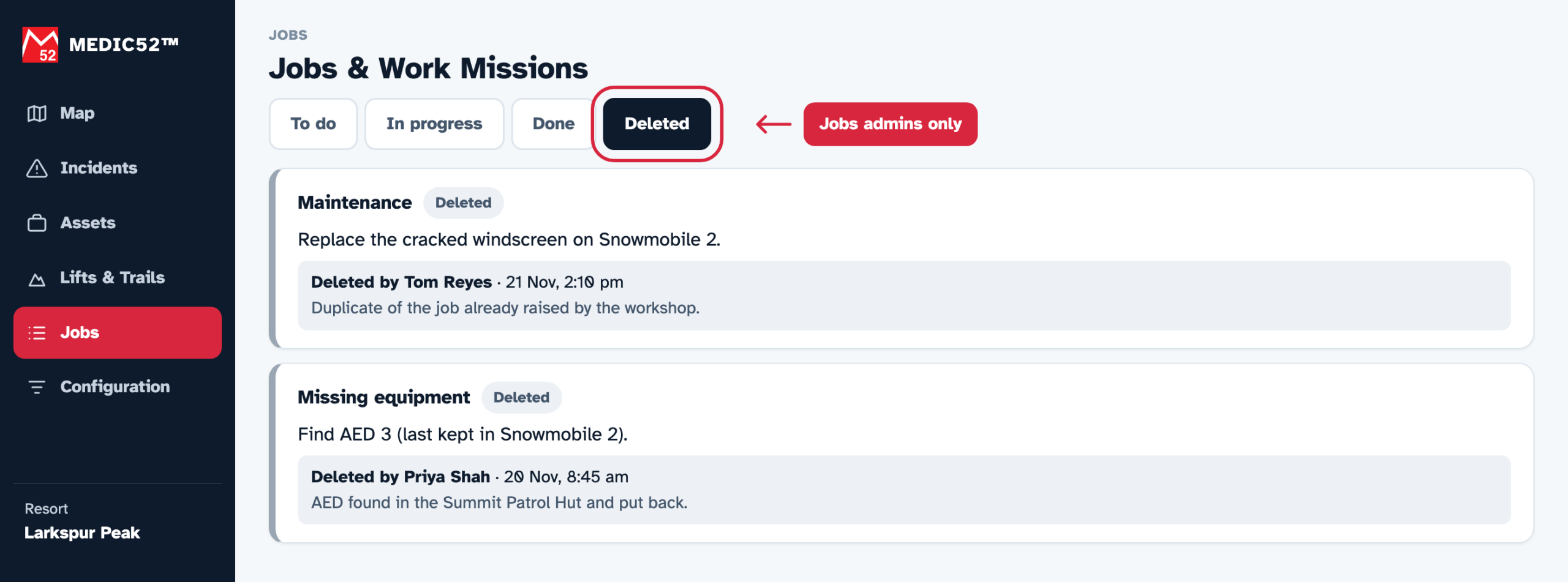
- Click the Deleted tab. It is shown only to Jobs admins.
Each card has a Deleted badge and shows Deleted by the person's name, the date and time, and the reason. The newest deletion is first. All, Mine and My departments still narrow the list. If nothing has been deleted, the tab says "Deleted jobs and the reason they were deleted show here."
How do I restore a deleted Job?
- On the Deleted tab, click the Job card. It opens as Deleted job, read-only, with a banner showing who deleted it and why.
- Click Restore job.
- In Restore this job?, enter a Reason. Medic52 says: "The job goes back to its list with its old status. Say why it is being restored."
- Click Restore job.
The Job returns to the tab it was in with the status it had, and opens in Edit job. A reason of at least 3 characters is required: "Please give a reason for restoring this job."
How do I see the history of a deleted Job?
On the Deleted job screen, click History. The Status history shows a row marked deleted or restored with its reason, together with the earlier status changes.
Frequently asked
Can I edit a deleted Job?
No. A deleted Job is read-only, for everyone. Restore it first.
Is a deleted Job gone for good?
No. Medic52 keeps the Job and its history for audit. Only a Jobs admin can see and restore it.
Can I delete a Job someone else created?
Yes, if you have User or Admin Jobs permission. Give a clear reason, because it is recorded with your name.
Should I delete a Job or mark it Done?
Mark it Done when the work was completed. Delete it when it should not have existed, such as a duplicate.